FM Radio, Live FM, Live radio
- 4.3
- Rating
- 5.00M
- Installs
- Free
- Price

 Analysis by App-foxy
I spent time with FM Radio, Live FM, Live radio as a straightforward way to listen to broadcasts on an Android phone, and its appeal became clear quickly: it aims to keep radio listening simple rather than turning it into a crowded music platform. It sits in the Music & Audio category, is free to install, and is suitable for Everyone. The app is developed by Watermark Remover & Slow motion & SlowMo, a name that feels unusual for a radio tool, but the result is focused enough for everyday listening.
My main interest was not only whether I could start a station quickly, but also how comfortable the experience would be for people using it in different situations. Radio can be useful when someone wants spoken content without staring at a screen, when a familiar local station is easier than searching through an enormous streaming catalog, or when a person prefers a simple live broadcast to algorithmic recommendations. At the same time, a basic interface can create its own problems if labels are unclear, controls are small, or the app depends too heavily on touch.
How the app feels to use from the first launch
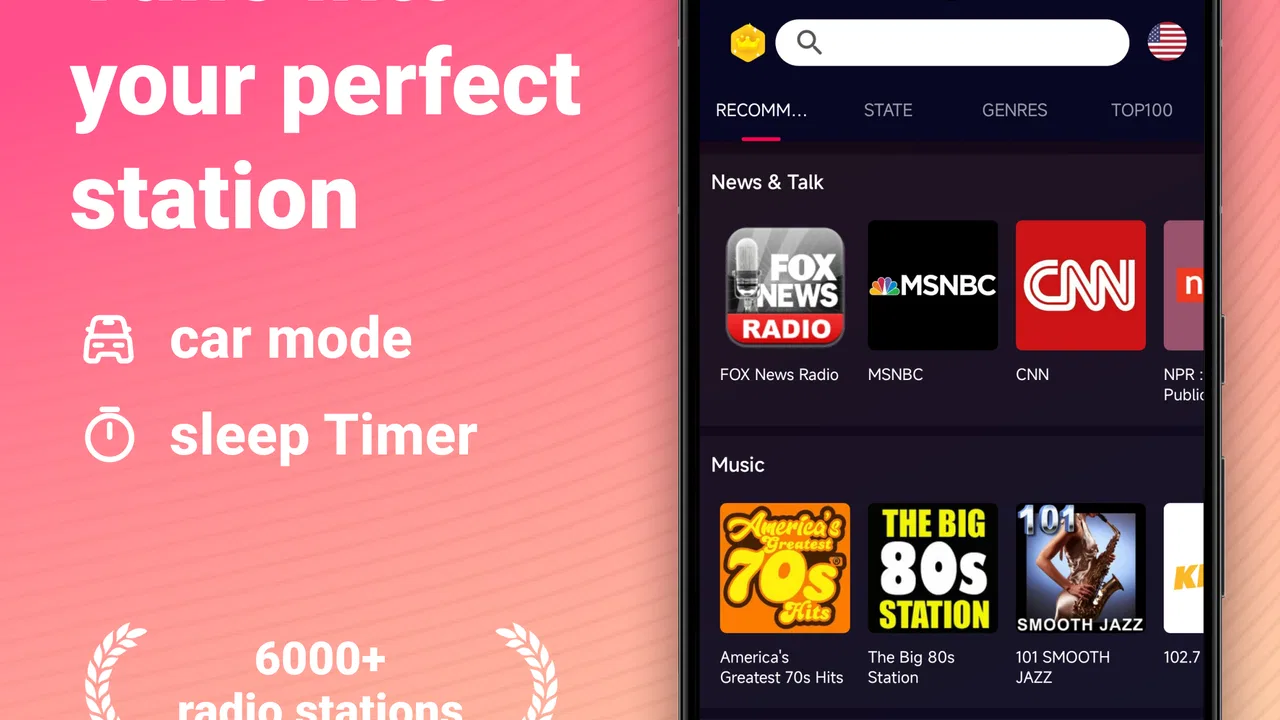
The app presents itself as an FM radio tool with access to local radio stations, music radio, live FM and AM listening, and Android Auto support. That combination gives it a wider role than a single-purpose tuner. I found the concept most convincing for someone who wants a familiar station or live broadcast without building playlists, managing downloads, or learning a complicated audio service.
You May Also Like

 Blood Strike: 2.5 Anniversary
Blood Strike’s Loadouts Turn Every Drop Into a Tactical Gamble
A close look at Blood Strike’s custom loadouts: how fast access to signature weapons reshapes its battle royale rhythm, rewards preparation, and narrows the gap between fights.

 Pandora - Music & Podcasts
Pandora’s Music Is Easy to Start, but Harder to Recover
Pandora’s strength is its low-effort path from a seed to a station. Its weak spot is how much confidence it asks you to place in connection, setup, and quiet recovery.

 8 Ball Pool
 Is Built on Rivalries, Rematches, and Routine
A close look at the rivalries, rematches, shared routines, and unanswered safety questions that turn a quick pool match into a persistent mobile community.

 Samsung Music
’s Quiet Strength Is Playing What You Already Own
Its reach comes less from spectacle than from dependable access to a personal library. That simplicity is both the app’s strongest retention engine and its ceiling.

 AccuWeather: Weather Radar
AccuWeather Review: A Quick, Clear Forecast for Everyday Decisions
For everyday plans, the best forecast is the one you can understand quickly. AccuWeather makes rain timing, radar, and local conditions easy to act on, with a few trade-offs.

 Hill Climb Racing
Why Hill Climb Racing Still Turns Crashes Into One More Run
A tiny car, a bumpy hill and one more upgrade: Hill Climb Racing keeps resurfacing because its simple chaos makes every near-miss feel personal.
More From Our News Desk



The store short description is simply “FM Radio,” and that accurately sets the expectation. This is not an ambitious replacement for every music service. Its strength is the directness of the idea: open the app, look for a station, and listen. That simplicity can be helpful for people who are uncomfortable with layered menus or recommendation-heavy interfaces, although the actual ease still depends on how clearly the available stations are presented on a particular device and in a particular location.
For a new user, I would begin by checking the station list before changing anything else. If the local options are easy to recognize, the app can become a useful daily shortcut. If the list feels unfamiliar or requires too much searching, the experience loses its main advantage. Radio apps live or die by the time between opening the app and hearing something worthwhile, so I paid more attention to that practical path than to decorative details.
Readability and navigation in everyday use
Readability matters more in a radio app than many people expect. A listener may be checking the screen briefly while preparing breakfast, walking through a room, or sitting in a parked car. Clear station names and controls are more valuable here than dense information panels. I would favor the app when its main screen keeps the current station and basic playback action visually obvious, because that reduces the need to interpret several competing controls.
There is also a useful distinction between browsing and listening. Browsing benefits from readable text and recognizable station labels, while listening should require as little screen interaction as possible. I found that the app makes the most sense when treated as a quick-access radio shelf rather than as a place to explore endlessly. Users who enjoy discovering obscure broadcasts may find a dedicated internet-radio directory more satisfying, while users who already know what they want may appreciate this narrower focus.
The app’s audience size suggests that the basic idea is resonating: it has an average rating of 4.4 from around 26 thousand ratings and has passed 5 million installs. Those figures do not tell me whether every user finds navigation equally comfortable, but they do indicate that this is an established option rather than an obscure experiment. I would still judge the interface on the phone in front of me, especially if text scaling or display magnification is important.
One practical habit helped me: I treated the first successful station selection as the starting point for a routine. Instead of repeatedly scanning the whole list, I noted which stations worked reliably and returned to them. That approach reduces visual searching and makes the app more accessible for someone who finds repeated browsing tiring. It also exposes a trade-off: the app is most comfortable when the user has a small set of preferred broadcasts, not when every listening session begins with a long hunt.
Motor and sensory considerations
Audio apps can support people with different abilities simply by allowing attention to move away from the screen, and this one benefits from that basic quality. Once a broadcast is playing, the listener can focus on cooking, commuting, household tasks, or conversation instead of continuously reading. For someone with visual fatigue, that is more meaningful than a visually elaborate player.
However, reduced screen dependence does not remove every motor challenge. Starting a station, changing broadcasts, and adjusting playback still require accurate touch interaction. People with tremors, limited reach, or difficulty with small controls may prefer using the app in a stable position, such as on a desk or a secure vehicle mount. Android Auto support is particularly relevant in this context because it can place radio controls within a driving-oriented interface, but I would never treat that as permission to handle a phone while driving.
For listeners with hearing loss, the value of any radio app depends heavily on the broadcast itself. Music may remain enjoyable, but speech clarity can vary between stations, presenters, and programs. The app gives access to live content; it cannot make every voice equally intelligible. I would test a few talk stations at a comfortable volume and compare them with music stations before deciding whether it fits a hearing-sensitive listening routine.
People who are sensitive to sudden changes in loudness should also approach live radio with care. Broadcasts can move from quiet speech to music, advertisements, or announcements without the predictable volume of a downloaded track. I found the safest routine was to begin at a low level, let the broadcast settle, and then increase it gradually. That is a general live-radio consideration, but it is especially important when the app is used through headphones or in a quiet room.
Another non-obvious benefit is that live radio can reduce decision fatigue. A person who becomes overwhelmed by huge catalogs may find one station easier than choosing an artist, album, playlist, or mood. The trade-off is control: unlike an on-demand music service, a live station decides what comes next. I would recommend this app to someone who values companionship and continuity more than precise song selection.
Situational access: where it fits best
A realistic everyday use is a morning routine. I can imagine placing the phone on a kitchen counter, selecting a familiar local station, and listening while making coffee and preparing for work. In that situation, the app’s usefulness comes from reducing interaction. The listener does not need to build a queue or keep looking at the display, and live programming provides a sense of time and place that an offline playlist does not.
It can also suit someone who wants local context. Local radio often reflects nearby traffic, weather, community announcements, or regional interests in a way that a global streaming service may not. The app’s support for local stations makes it more relevant to that listener than a generic music player. Still, local availability is central to the experience, so I would check whether the stations I care about appear before making it my primary radio tool.
Android Auto support gives the app a useful place in car-based listening. A driver can benefit from having radio available through a familiar vehicle-focused system instead of reaching for the phone. The important accessibility point is not merely convenience; it is keeping the interaction short and predictable. I would configure the station choices before setting off and avoid any browsing that demands visual concentration on the road.
The app may also be helpful during internet interruptions if the relevant radio function is receiving a local broadcast rather than relying entirely on online streaming. I would not assume that every station or listening mode behaves identically, because the app combines local radio with music radio and live FM and AM content. The sensible approach is to test the exact stations needed at home before depending on them during travel or an outage.
For older relatives, the app could be a reasonable option if they already understand radio and only need a digital version of that habit. I would set it up with them rather than handing over an unexplained interface. Showing how to return to a known station, change the volume, and stop playback may be enough. The app is less suitable for someone who needs large, highly customizable controls or a fully guided accessibility experience.
What may still create barriers
The biggest limitation is that “simple” does not automatically mean inclusive. A short station list can be friendly, but unclear labels, inconsistent station availability, or controls that are difficult to distinguish can quickly undermine that benefit. I would not recommend assuming that the app will suit every screen size, vision level, or motor ability without trying it on the intended device.
Live radio also brings dependence on broadcast quality and context. A station may be excellent in one place and less useful in another. Music, speech, and advertisements may have different loudness or clarity. Anyone who needs reliable captions, transcripts, searchable program details, or exact control over content should look toward a service designed around those needs rather than expecting a live tuner to provide them.
The free model lowers the entry barrier, but in-app purchases range from $4.99 to $39.99 per item. That does not make the initial download expensive, yet I would pay attention to any upgrade prompts and decide whether the free experience already covers my listening routine. For a person who wants a no-cost tool with no interest in extras, unexpected purchase invitations can be distracting even when they are easy to dismiss.
The current version is 3.5.7, and the app requires Android 6.0 or later. That gives it a broad compatibility range for many Android users, but device age still matters for comfort. A phone with a small display, weak speaker, or outdated system may make text and touch controls harder to use even if the app technically installs. I would test it on the actual phone intended for daily listening rather than judging compatibility from the operating-system requirement alone.
There is also a social and sensory trade-off with headphones. They can make speech easier to hear in a noisy environment, but they may reduce awareness of nearby sounds. For walking, cycling, or working around other people, I would use a cautious volume and remain aware of the surroundings. In a shared room, the phone speaker may be more inclusive for group listening, although its clarity will depend on the device and the broadcast.
Who should choose it, and who should skip it
I think this app is a good match for someone who wants familiar radio without the overhead of a full music subscription. It is especially appealing to listeners who enjoy local programming, prefer live broadcasts, or want a simple audio companion for chores and commuting. Its free starting point and Everyone content rating also make it easy to consider for a household with mixed ages.
I would be more cautious for a person whose priority is exact control. If you need to replay a particular song, remove advertisements, download programs, read transcripts, or create a carefully timed playlist, an on-demand music or podcast service will probably be better. The same applies to listeners who need extensive accessibility customization. A dedicated player with stronger text, control, and playback options may justify its extra complexity.
Compared with a traditional hardware radio, the app offers the convenience of carrying one device and potentially connecting the experience with Android Auto. Compared with a large streaming platform, it feels less personalized and less precise, but that can be a benefit for anyone tired of endless choices. Compared with a podcast app, it is more immediate and live, yet less forgiving if the current program is not interesting. Those differences are not flaws by themselves; they define the kind of listener this app serves.
My advice is to test it using three situations rather than one: a quiet room, a noisy place, and a short trip where you need minimal interaction. Check whether the text is comfortable, whether station changes are manageable, and whether the broadcasts you care about are easy to reach. That small trial reveals more than a rating because accessibility is personal and strongly affected by the phone, the environment, and the listener’s habits.
My inclusive verdict
After using FM Radio, Live FM, Live radio, I see it as a practical live-audio option with a clear audience: people who want radio to remain radio. Its strongest inclusive quality is the chance to listen without constant visual attention, while local stations and Android Auto support make it relevant in home and travel routines. The experience is most successful when the listener has a few preferred stations and wants quick access to them.
It is not a complete answer for every ability or every listening need. Touch accuracy, station clarity, broadcast loudness, and the limits of live programming can all become barriers. The in-app purchase range also means I would review the upgrade prompts carefully before recommending it to someone seeking a completely uncomplicated free experience.
Still, I would recommend giving it a try if you want an accessible-in-practice radio habit rather than an enormous catalog. The best reason to choose it is its low-demand listening style: set up a familiar station, keep the phone nearby, and let the broadcast carry the session. For users who need transcripts, deep playback control, or highly adjustable interaction, another audio app will be the wiser choice. For everyone else, this free FM and live-radio tool offers a sensible bridge between old-fashioned radio familiarity and phone-based convenience.
FAQs for FM Radio, Live FM, Live radio
01What features does the FM Radio app offer?
The FM Radio app provides access to a vast array of live radio stations from around the world, covering music, news, sports, and talk shows. It includes features like station search, favorites lists, sleep timer, and customizable themes, all designed for an enhanced listening experience.
02Is an internet connection required to use the FM Radio app?
Yes, an internet connection is necessary to stream live radio stations through the app. While some devices may support FM tuners for offline listening, this app primarily functions through online streaming, ensuring access to a global selection of stations.
03Can I listen to local radio stations using the FM Radio app?
Absolutely! The FM Radio app allows you to search and listen to local radio stations in your area. Whether you're interested in local news or music, the app ensures you can stay connected with your community's broadcasts easily.
04Does the FM Radio app support offline listening?
The FM Radio app does not support offline listening as it streams content from online stations. However, users can save their favorite stations for quick access, ensuring they can easily tune in whenever they have an internet connection.
05Is the FM Radio app free to use, or does it require a subscription?
The FM Radio app is free to download and use, offering a wide range of features at no cost. However, there might be in-app advertisements, and some premium features may require a subscription or one-time purchase to enhance the listening experience further.
Pros
- Wide variety of global radio stations.
- User-friendly interface with easy navigation.
- Minimal buffering ensures smooth streaming.
- Offline mode available for favorite stations.
- Customizable station list for quick access.
Cons
- Contains ads that may interrupt listening.
- Limited customization of the app interface.
- No option for recording live broadcasts.
- Some stations may have inconsistent audio quality.
- Requires internet connection for most features.

FM Radio, Live FM, Live radio
Gallery